Contact Center & CCaaS
Your customers don't care which platform you bought.
They care that someone answers, and that they don't have to explain it twice.
Cloud Contact Center Solutions, Compared Across Competing Providers
Your customers judge you by how fast you answer and how few times they repeat themselves. Gateway scopes the routing, reporting, and integration you actually need, brings two to three competing proposals with real pricing, and manages your chosen provider through go-live.
The Cost of a Contact Center That Fights Your Agents
Turnover is the largest line item nobody puts in the budget.
What a Modern Contact Center Platform Actually Changes
Most contact center pain is not a people problem. It is calls landing in the wrong queue, agents toggling between four screens to answer one question, and supervisors flying blind until the monthly report lands. Cloud contact center platforms fix that with skills-based routing, screen pop from your CRM, live queue dashboards, and recording and quality scoring built in — priced per seat, with no on-premise hardware to refresh. The hard part is that dozens of platforms all demo beautifully. The differences that matter show up in how they handle your call volume, your integrations, and your compliance obligations.
The larger shift is what now happens before a call ever reaches a queue. AI voice agents handle the routine traffic end to end — order status, appointment changes, balance questions, password resets — in natural conversation, and hand off to a person with full context the moment the request stops being routine. For most teams that removes a meaningful share of inbound volume, which changes the seat count you are buying before you buy it. The caveat is that demos are flattering and live traffic is not: containment rates vary widely by provider and by how messy your callers' requests actually are. We push for a pilot on your own call types before you commit to a platform, and we size the seats against what the AI genuinely absorbs rather than what the vendor projects.
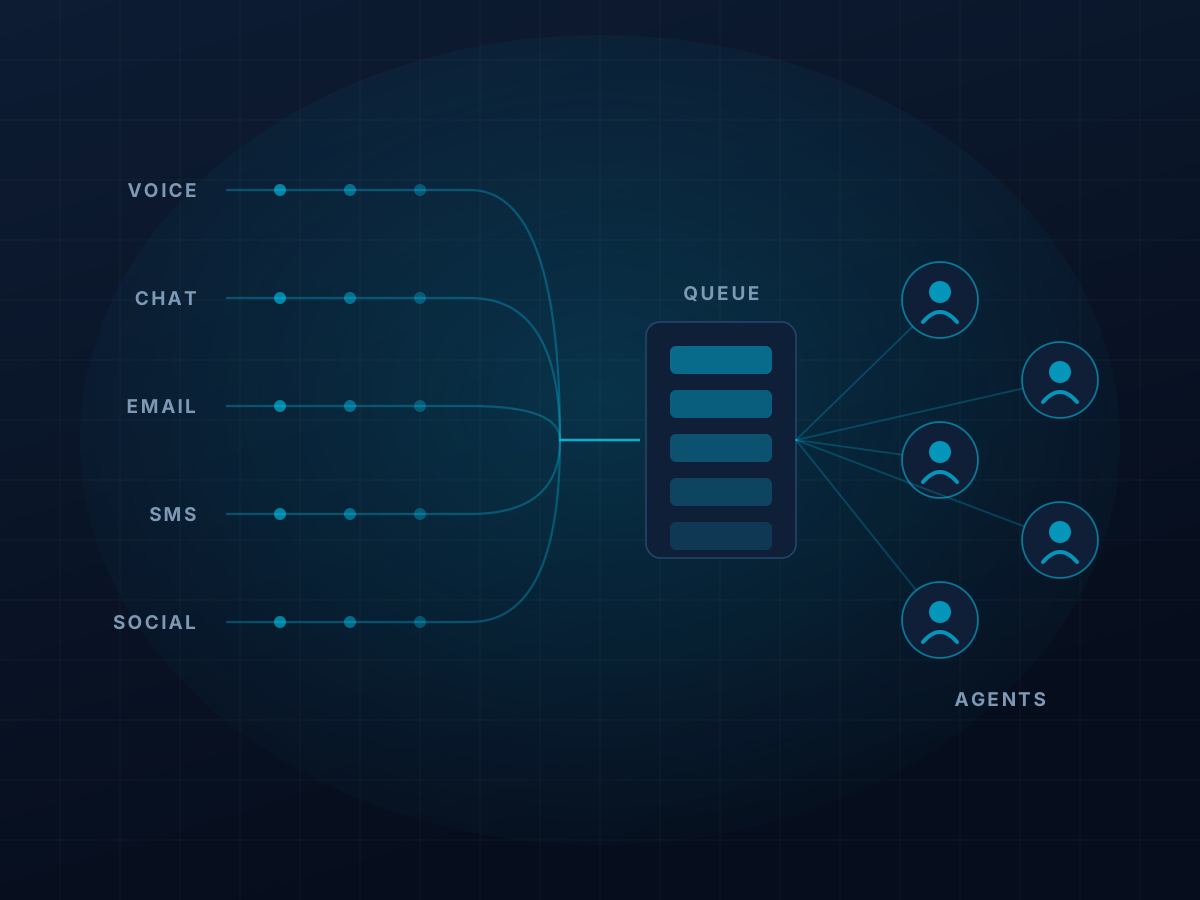
- Omnichannel — voice, email, chat & SMS
- Skills-based & priority routing
- IVR & conversational self-service
- CRM screen pop & integration
- TCPA-compliant outbound dialers
- Call & screen recording
- Quality management & agent coaching
- Workforce management & forecasting
- Real-time & historical reporting
- AI agent assist & call summarization
- Speech & sentiment analytics
- PCI & HIPAA-compliant payment capture
- Remote & hybrid agent enablement
- Microsoft Teams & UCaaS integration
What a Contact Center Seat Costs Per Agent
Most cloud contact center seats land between $65 and $150 per agent per month. Entry tiers with voice queueing and basic reporting sit at the low end. Mid tiers adding digital channels, call recording, and quality management run $95 to $130. Full enterprise suites with workforce management and native AI go past $200. Those are real ranges, not quotes.
The number that actually matters is your total, and the advertised per-agent rate is rarely it. Watch for what sits underneath: telephony usage, because some providers bundle domestic minutes and others meter every one, AI and agent-assist add-ons priced separately per seat or per interaction, professional services for routing design and CRM integration, and promotional pricing that steps up in year two. Two quotes at the same headline rate can differ by well over thirty percent once all of it is on the page.
Agent count and channel mix move pricing more than anything else. A fifteen-seat support desk in Clayton and a two-hundred-agent operation in Earth City are not shopping the same market, and the providers competing hardest at each size are different. Outbound-heavy and international traffic change the math again, since metered minutes can quietly become the largest line on the bill. We put the competing quotes side by side with all of it visible, and what we're paid never decides which one we recommend.
How We Run a Contact Center Selection
Most bad contact center decisions get made off a single vendor demo, where every platform looks equally capable. This is the process we use instead — it takes the guesswork out, and it costs you nothing.
Discovery
We map what you actually run: agent counts, queue and routing structure, peak call volumes, which channels you need now versus later, CRM and Teams integrations, recording and compliance obligations, and where the current setup is failing your customers.
Sourcing
That requirement set goes out to the platforms that genuinely fit. You get two to three competing proposals back, normalized side by side so you are comparing the same scope, not three different sales stories.
Decision Support
We sit on your side of the table for pricing, term length, SLA, and porting language. You make the call. We are not paid more if you choose one platform over another.
Cutover & Aftercare
We project-manage number porting, routing build, CRM integration, supervisor and agent training, and go-live — then stay on as your escalation path for the life of the contract, not just through launch.
What a Contact Center Project Covers
Contact center is rarely just routing. Whatever touches the customer conversation comes with the project.
Inbound Routing & Queueing
Skills-based and priority routing, overflow and after-hours handling, estimated wait time, and queue callback so customers stop holding. IVR and conversational self-service for the calls that never needed an agent.
Outbound & Dialers
Preview, progressive, and predictive dialing matched to your contact strategy, with TCPA consent handling, do-not-call suppression, and answering machine detection built into the workflow rather than bolted on afterward.
Digital & Omnichannel
Web chat, email, SMS, and social handled in the same agent desktop as voice, with conversation history that follows the customer across channels so they never start over.
Workforce Engagement
Volume forecasting, shift scheduling, and adherence tracking, plus call and screen recording, quality scoring, and coaching workflows that give supervisors something better than a monthly spreadsheet.
AI & Agent Assist
Voice and chat bots for routine contacts, real-time agent assist and knowledge surfacing, automatic call summarization, and speech and sentiment analytics across the whole interaction set instead of a sampled few.
Integration & Compliance
CRM and ticketing integration with screen pop and click-to-dial, recording retention rules, PCI-compliant payment capture, HIPAA handling where it applies, and number porting planned so nothing goes dark on go-live day.
Do You Need a Contact Center, or Just a Better Phone System?
This is worth settling before anyone books a demo, because the two products look similar in a slide deck and behave nothing alike in production. Plenty of companies get quoted a full contact center suite when a cloud phone system with a well-built hunt group would have done the job for a fraction of the cost.
The dividing line is usually queue behavior. If calls arrive faster than your people can pick them up, and it matters who answers which one, you need a contact center. If calls are simply passed around a small team, you probably do not. The second test is supervision — if someone needs live queue visibility, whisper and barge, or recorded calls scored against a rubric, that only exists properly in a contact center platform. The third is channel mix: the moment chat, SMS, or email need to sit in the same queue and the same reporting as voice, a phone system alone stops being enough.
There is a middle option most vendors will not volunteer. Contact center seats can be layered onto a standard phone system for only the people who need them, leaving everyone else on ordinary voice licenses. For a fifty-person business where eight people answer the phones, that structure changes the three-year number considerably. The platforms competing in this space — RingCentral, Zoom, 8x8, Nextiva, Dialpad, Five9, Genesys, Talkdesk, and NICE among them — all support that split differently and at very different price points.
We will tell you when you do not need a contact center, even though the smaller deal pays us less. Getting that call wrong is the most expensive mistake in this category — in either direction.
Porting, Spam Labeling, and What Happens When the Internet Drops
You keep your numbers. Porting a 314 or 636 number to a new platform is routine, and your current carrier cannot refuse a valid request simply because they would rather keep you. What they can do is delay it over a billing dispute, a mismatched service address, or a name on the account that no longer matches your paperwork. Simple ports typically clear in one to two weeks; larger or messier ones run three to four. We coordinate the porting paperwork with your chosen provider and make sure the old service stays active until the new queues are confirmed working.
If you dial out, expect your calls to get labeled as spam — and plan for it. Carriers score outbound numbers on how often calls are answered, rejected, or reported, and a number that starts getting flagged can quietly halve your connect rate before anyone notices. The fixes are real but they take setup: proper STIR/SHAKEN attestation through your provider, registering your numbers for branded calling so your business name displays instead of a bare number, spreading outbound across a sensible pool rather than hammering one caller ID, and monitoring reputation continuously. Most platforms support all of this. Very few volunteer it during the demo.
And yes, a cloud contact center depends on your internet — but that is a solvable problem, not a reason to keep an aging on-premise system. A platform designed for outages fails over automatically: queues reroute to mobile apps or backup numbers, agents can log in from home on a browser, and a router with a wireless backup connection keeps the office running when the primary circuit drops. Because agents are not tied to a desk phone, a well-designed cloud contact center is usually more resilient than what it replaced. We design the failover path before go-live, not after the first outage.
Contact Center Teams We Support
The right platform depends less on your industry label than on how customer conversations actually move through your day. A few patterns come up constantly across the metro.
Healthcare and patient access
Scheduling lines that spike every Monday morning, after-hours triage that has to reach the right clinician, and abandon rates nobody is measuring. Queue callback pays for itself here. If patient information passes through recordings, transcription, or messaging, you need a provider that will sign a business associate agreement — and not all of them will.
Insurance and financial services
Clayton and downtown are thick with them. The recurring needs are call recording with defensible retention rules, PCI-compliant payment capture that keeps card numbers out of the recording, and quality scoring that stands up to an audit rather than a spot check.
Home services and the trades
Every missed call is a booked job lost to the next company on the list. Dispatch routing, emergency after-hours paths, and texting on the main number matter more here than any dashboard. Seasonal volume swings make flexible seat counts worth negotiating up front.
Distribution and manufacturing support
The Riverport and Earth City corridors run order status, returns, and account service desks where agents live inside an ERP or CRM all day. Screen pop and click-to-dial remove most of the handling time, provided the integration is real rather than a checkbox on a feature matrix.
Outbound and collections teams
Dialer strategy, consent capture, do-not-call suppression, and caller ID reputation are the whole game. The platforms differ sharply in how much TCPA protection they build into the workflow versus leave to your supervisors to remember.
Nonprofits and member services
Tight budgets, volunteer or part-time staffing, and volume that concentrates around campaigns and enrollment periods. Nonprofit pricing exists at several providers and is frequently unadvertised.
We work with teams from a handful of agents up to several hundred seats nationwide, with our deepest roots across St. Louis City and County, St. Charles County, and the Metro East. If your situation does not look like any of the above, that is fine — the sourcing process is the same.
Contact Center Questions We Get Asked
What does a contact center seat cost per agent?
Most cloud contact center seats land between roughly $65 and $150 per agent per month depending on channels, AI features, contract length, and seat count. Full enterprise suites go past $200. The bigger variable is usually what gets bundled — telephony minutes, recording storage, quality management, and AI are line items on some platforms and included on others, which is exactly why comparing list prices alone is misleading.
How much does a small contact center cost per month?
For a team of eight to ten agents, budget roughly $700 to $1,300 a month for the platform itself, plus one-time professional services for routing design and CRM integration. Outbound-heavy teams should add for metered minutes. The wide part of that range is channels and AI, not vendor greed: voice-only queueing is comparatively cheap, and digital channels, workforce management, and agent assist are what move the number.
What does Gateway charge for this?
Nothing, and you never pay more than you would going direct. The providers compensate us, and they do it as a small monthly residual paid over the life of your agreement rather than a lump sum at signing. Where one provider's compensation differs from another's, that difference never decides what we recommend — which is the point of the model. You end up with the platform you need, not the biggest one available.
What happens to our queues if the internet goes down?
A properly configured platform does not go dark. Queues reroute automatically to backup numbers or to agents logged in from home, and a router with wireless backup keeps the office connected when the primary circuit drops. Because the routing logic lives in the provider's cloud rather than in a box in your closet, an outage at your building does not take the contact center with it. The failover path should be designed before go-live, not after the first outage.
Will we lose our phone numbers?
No. Your numbers are portable and they stay yours. Porting is the part of a migration most likely to go sideways when handled casually, so we inventory every main line, DID, and toll-free number up front and sequence the port rather than flipping everything at once.
Can agents work from home on the same platform?
Yes, and for most platforms it is simply a browser login with a headset — same queues, same routing, same recording and reporting as in the office. Supervisors keep live visibility and can still whisper, barge, and monitor. The differences worth checking during selection are how the platform handles home network quality, whether it enforces anything about the agent's environment, and what the supervisor experience looks like when the team is split across locations.
What is the difference between UCaaS and CCaaS?
UCaaS is your phone system — extensions, voicemail, mobility, and simple hunt groups for the whole company. CCaaS adds the machinery for teams whose job is handling customer conversations at volume: skills-based queueing, live supervisor tools, quality scoring, workforce scheduling, and digital channels in one place. Many businesses need both, and the seats do not have to match — you can license contact center for the eight people who answer the phones and standard voice for everyone else.
Can a phone company refuse to port your number?
Not for a valid request — number portability is a regulatory requirement, not a courtesy. What they can do is reject a request over mismatched details: a service address that does not match their records, an outstanding balance, or an account name that changed after an ownership transfer. Almost every rejected port we see is a paperwork problem rather than a real refusal.
How long does a contact center implementation take?
A straightforward voice-only deployment of ten to thirty agents typically runs six to ten weeks from signature to go-live. Add digital channels, CRM integration, or workforce management and it stretches further, because the routing design and testing genuinely deserve the extra weeks. Anyone promising a complex contact center in two weeks is quoting the provisioning, not the build.
How long does it take to port a phone number?
Simple ports usually clear in one to two weeks. Larger blocks, toll-free numbers, or accounts with billing complications run three to four. Your existing service stays live throughout, so there is no window where calls go nowhere.
What is skills-based routing, and do we actually need it?
It routes each contact to the agent best equipped to handle it — by language, product line, account tier, or certification — rather than to whoever happens to be free. You need it when the wrong agent answering causes a transfer, and transfers are where satisfaction goes to die. If your team is small enough that everyone handles everything, you do not need it, and you should not pay for a tier that includes it.
How do I choose a contact center platform?
Start with how conversations actually move through your business rather than with a feature list. Count your agents and your peak concurrent volume, map how contacts should route and escalate, decide which channels you need now versus in two years, and identify every system an agent has to touch mid-conversation. Then compare at least two or three providers against that, with all costs on the page. Most bad contact center purchases come from comparing one vendor's proposal against nothing.
Is a cloud contact center secure, and can it meet HIPAA or PCI?
The major platforms encrypt calls and recordings and will sign a business associate agreement for HIPAA, though not all of them will, which is worth confirming before you fall in love with a demo. For card payments, look for pause-and-resume or secure payment capture that keeps card numbers out of the recording entirely. The breaches that actually happen are unglamorous: weak admin credentials, no multi-factor authentication, over-broad agent permissions, and recording retention nobody ever configured.
Why are our outbound calls showing up as spam?
Carriers and phone manufacturers score outbound numbers on answer, rejection, and complaint rates, and a number with a poor score gets labeled before it ever rings. The remedies are proper STIR/SHAKEN attestation through your provider, registering for branded calling so your business name displays, rotating outbound across a sensible pool of numbers rather than one, and monitoring reputation on an ongoing basis. It is fixable, but it is not automatic, and most platforms will not raise it unless you do.
Can we handle chat, SMS, and email in the same queue as calls?
Yes, and it is usually where the biggest efficiency gain sits, because agents stop toggling between separate tools and supervisors finally see one set of numbers. Two things to check: whether digital channels are genuinely unified or a separately licensed product bolted on, and whether SMS on your business number requires carrier messaging registration first — it usually does, and it has real lead time.
We are still under contract. Is it too early to talk?
No — it is the right time. Twelve to six months out is when you have leverage. Once you are inside the auto-renewal window your options narrow and the pricing conversation gets much harder.
Compare Contact Center Platforms Side by Side
Bring your agent count, your peak call volume, and a renewal date. In one 30-minute call we will tell you whether you need a contact center or just better routing, roughly what it would cost, and what the build actually involves.
Book a CallGet Competing Quotes
Tell us what you're running and we'll bring competing bids from 200+ providers — at no cost to you.
No cost, no obligation. Gateway Telecom Advisors is paid by the provider you select.